

Enterprise AI is evolving fast. To build the right strategy, leaders need to grasp a few new technical concepts. We just got back from the Salesforce TrailblazerDX conference, where the future of AI was front and center. We’ve distilled the noise into the critical decisions every organization must understand to grow.
At the heart of this evolution is the rise of the AI Agent: an automated program that can understand goals and take actions on your behalf within your software. Building a 360-degree view for both your people and these new AI agents is all about connectivity, security, and visibility. Salesforce’s suite of AI tools, prompts, and agents is broadly referred to as Agentforce.
Here are the key concepts and decisions you need to know. Let’s start with what still matters most: people.
People power the AI transformation and hold key insights
Salesforce conferences are fundamentally about human connection. Yes, there are sessions to attend and new features to learn, but the most valuable moments happen between the scheduled events—in conversations with product managers, software partners, and advocates who shape the industry behind the scenes.
These conversations give us insights that never make it into official documentation. Roadblocks, critical decisions, and the unofficial “in between the lines” commentary of where things are heading are highly valuable.
Our team has been analyzing these changes and considering not only “How can we use this for a client?”, but they are also asking: “How can we add this to our standard process and guides to help the whole team deliver smarter, faster solutions?”
We have a deep focus on:
- Governance & Org Health: Ensuring clean, sustainable Salesforce instances
- Automatic Monitoring: Catching issues before they become problems
- Error-to-Case-to-Task Automation: Streamlining incident management
- Document Generation: Realtime change logs, diagrams, and documentation
- AI Enablement: Equipping teams with AI tools and training
Those internal practices set the stage, but the bigger shift is how data and AI come together to support them.
Customer 360 + AI: The Unified Data Story
Whether you’re focused on helping people or agents understand your customers better, the goal hasn’t changed: a complete Customer 360 picture drives results. The question is now: how do you safely get there with AI?
Providing Clear Context
Would you rather have a sales rep go blindly to a meeting with your biggest customer, or go with full awareness of every deal, contact, and conversation that ever happened?
Context for agents is roughly the same as for people, it’s what information you provide to an agent to help it make decisions and return great work. Just like people, agents can only store so much information, and have to use frameworks and rules for accessing info to speed things up. They need to know where to look, and what slice or “Context-Window” is most important to evaluate. But any information that is not provided in context, is ignored.
There are two main paths to providing access to that context.
Unify vs. Integrate: A Critical Decision for AI
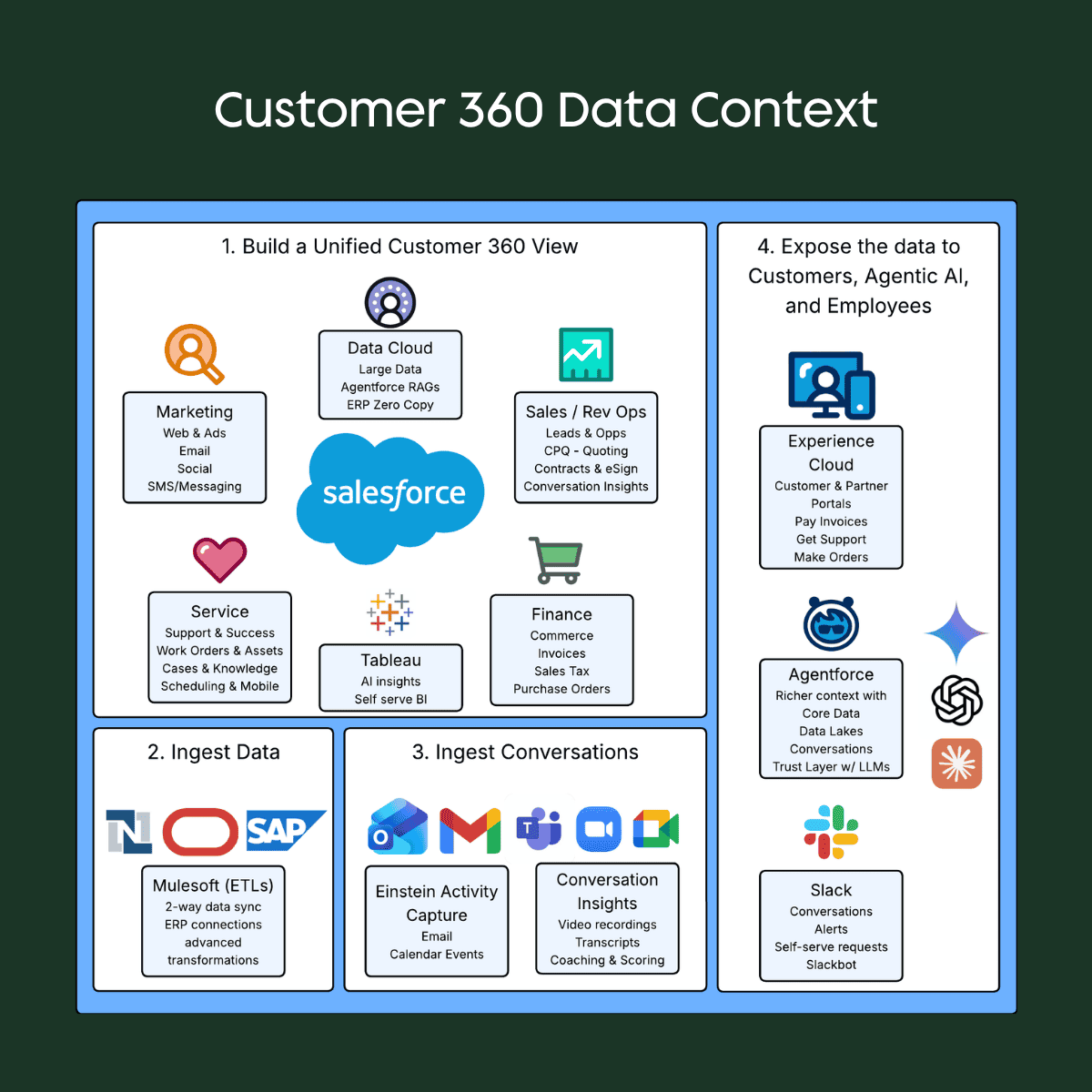
To get full context to people and agents, you have to provide access to all that information. Salesforce’s perspective is clear: it’s easier and safer to unify all your data and teams on a single platform than to integrate multiple “best of breed” systems. This principle becomes even more critical with enterprise-grade AI. Here is a diagram I put together to help think of all the data and conversations that you need to collect to give your team the full context, or 360 view:
- Consolidate data into key systems like Salesforce, NetSuite, and Microsoft or Google
- Ingest key data into Salesforce or your main C360 database so people and agents can easily see the full picture
- Ingesting conversations from email, events, and video calls is a big part of context
- Expose this clean view to customers and employees, along with Agents
If you are already in Salesforce, it’s very low risk to turn on Salesforce’s Agentforce and get running. You can build a prompt and give it context from Salesforce data in hours or days, vs. months. There are even prebuilt prompts that work very well including our sales rep example above of “Summarize this account including recent deals, cases, and key contacts.” If it’s all in Salesforce it’s a lot faster and safer than building integrations or letting users connect their own AI accounts.
The Integration Path: More Complex with AI
If you’ve chosen to integrate various systems, AI adds significant complexity. You now need a third-party tool to connect all systems and extract their data. If you use a 3rd party AI solution and your customer support is in a different system, you need to have a lot of conversations before connecting that all together. This forces you to have bigger conversations first and slow down including:
- Governance & Security: Who can connect, which AI is compliant, what data can it access?
- BI Layer Requirement: With siloed data how can we SEE it all? Do we need a BI layer now?
- Data Democratization Problem: How do those insights get back to frontline workers? Where can you really get Customer 360 view? Do you have to ask AI everytime? Does everyone have to access a BI tool vs. see it where they work?
The business impact is real:
- Sales reps need to see overdue invoices and unresolved support cases before renewal conversations with angry clients
- Field workers need real-time visibility into when equipment is obsolete and understand upgrade and warranty options
- Nonprofit fundraisers need a complete view of engagement, including how many people from your company have participated in their events before asking for renewals
Democratizing data to frontline teams enables faster, better decisions. This is a lot easier by unifying vs. integrating. You could just throw AI in the middle and connect it to every platform, but you will burn a lot of tokens and have a lot of transient insights tucked away in users’ AI chat history. It works in a pinch to get answers, but doesn’t solve Customer 360.
Agentforce as Orchestrator & Protector
If your data is already in Salesforce, the question shifts to “How do I safely connect my data to the best AI model for the job?” from “Which LLM provider should I invest in?”
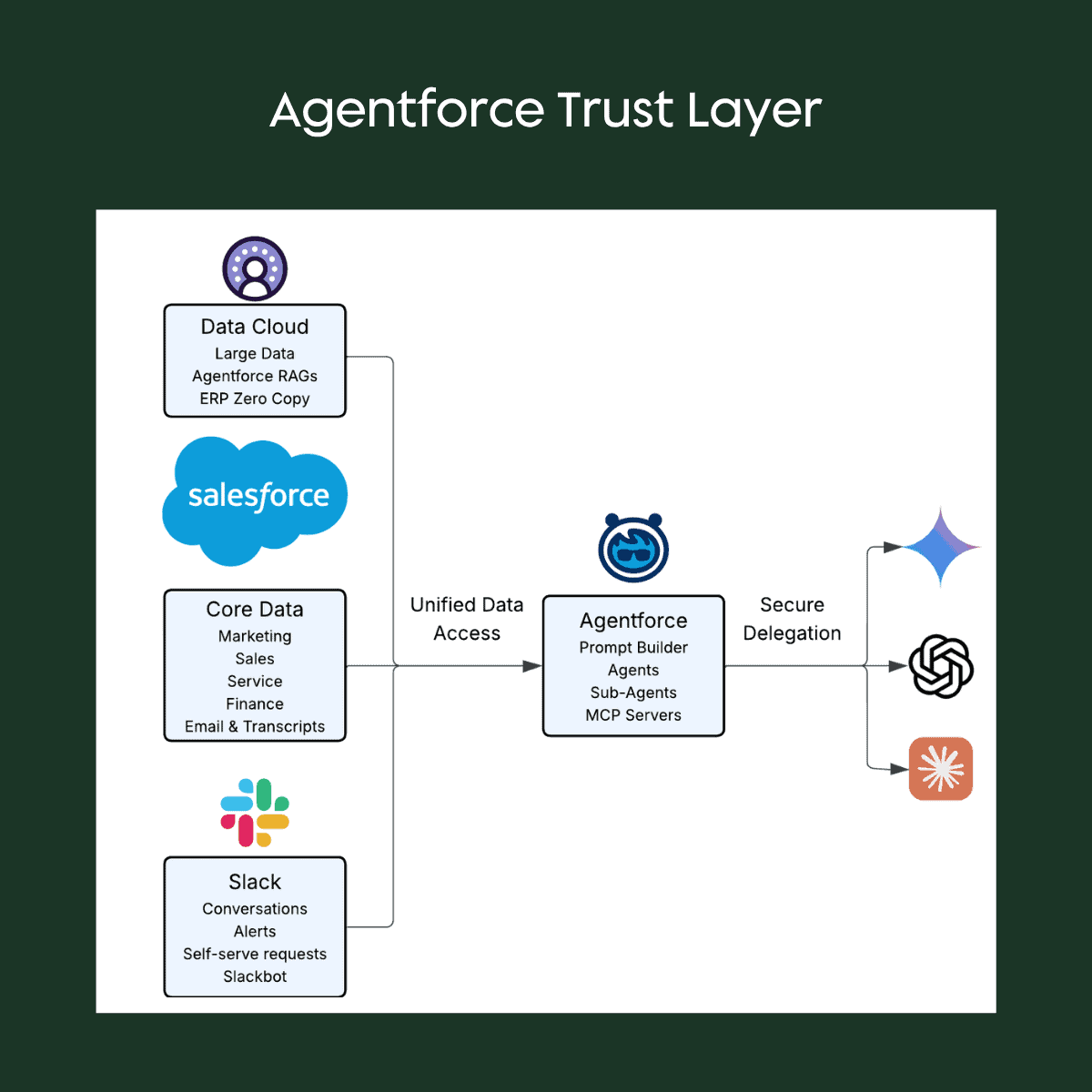
Agentforce provides critical benefits like:
- Instant Secure Access: To any data already in your Salesforce environment
- Trust Layer: Enterprise-level security agreements with any LLM provider, protecting your data
- LLM Vendor Flexibility: Models and costs evolve quickly and you need to be able to hotswap vendors and models just as fast.
This protects you from significant risks:
- Directly calling OpenAI from Salesforce with only Individual or Teams-level subscriptions can cause your proprietary data to leak out. It can also cause you to incorporate other leaked copyrighted data into your body of work.
- Users accidentally sharing proprietary data for training and reference by not unchecking defaults
- Vendor lock-in with a single LLM provider
Unless you maintain your own six-figure Enterprise agreements with OpenAI, Google, or Anthropic—or use Agentforce as your Trust Layer, or GitHub Copilot Enterprise—you could be putting your data at risk.
Model Flexibility & Token Cost Optimization
Agentforce lets you switch models with a simple picklist, and you don’t need individual contracts with AI vendors. Each prompt and agent can use different LLMs simultaneously, so you adapt to your business needs without locking into a “winner.”
This transforms deployment speed. Setting up a basic Agentforce prompt like “Summarize this account before my meeting” takes hours, not days or weeks of legal and contracting cycles.
Agentforce is also a team of agents, subagents and skills. Writing Code? Ask Agentforce Vibes and use GPT-5 or Opus. Asking about how do you close an Opp? Use a cheaper model that is better at business questions. You can also connect to your own proprietary models for certain tasks.
Slack Unifies Conversational Context
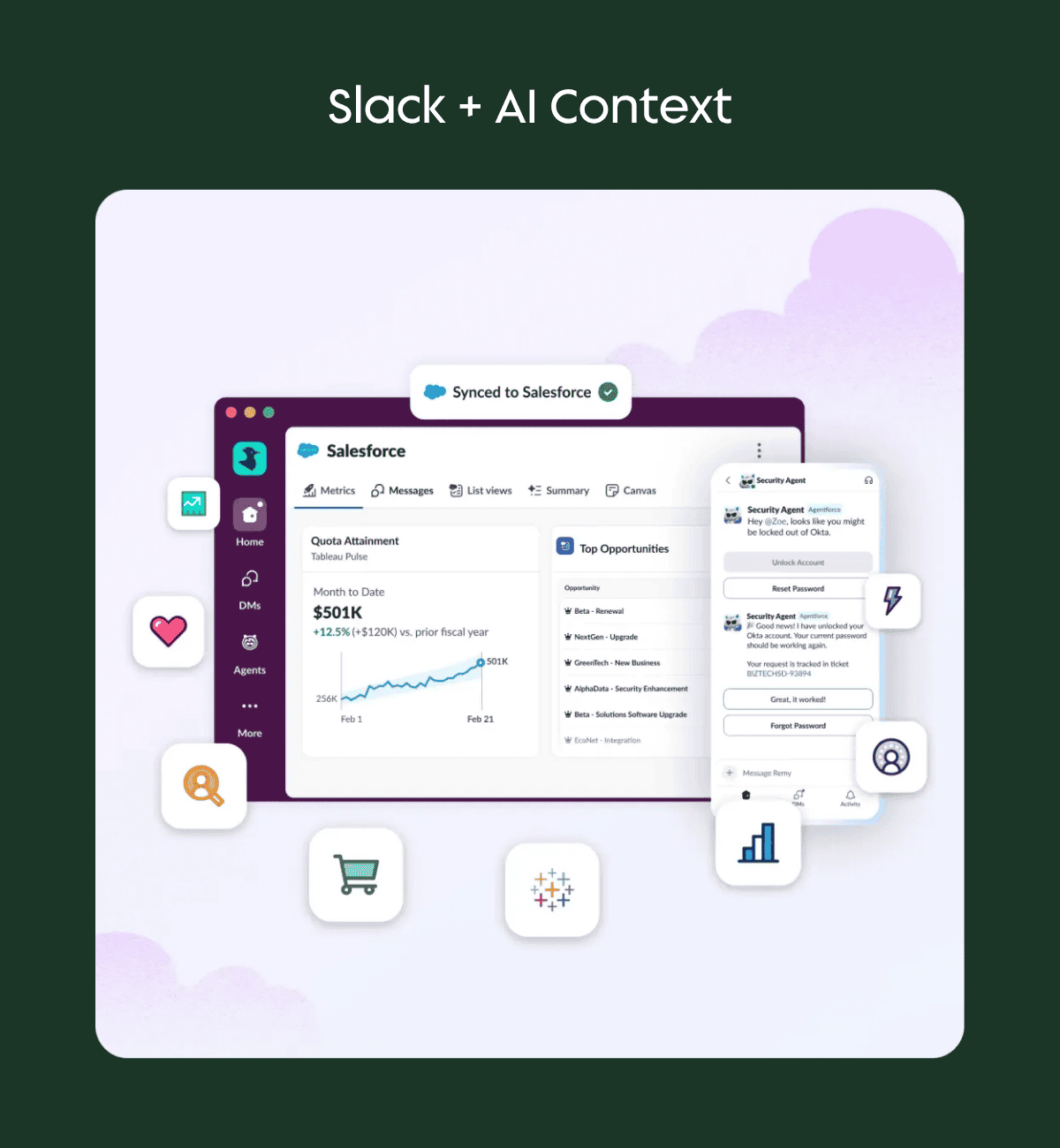
Agentforce has access to your Salesforce data, but not your Slack conversational history. As teams increasingly use Slack (and Slack Connect) to replace Chatter, you can replace the Agentforce chat interface and talk to humans and bots directly in Slack.
That bot combines Slack conversation history with Salesforce data for richer responses. And if you’re using Einstein Activity Capture for email, those conversations are already accessible in Salesforce—no need for separate AI connections to Outlook or Gmail.
AI Guardrails (MCP): The Instruction Manual for Agents
Model Context Protocol (MCP) is getting significant attention, but the concept is simple: it’s a set of rules and instructions you give your AI agents so they know what data they can access and what actions they are allowed to take. Think of it as the instruction manual that ensures your AI operates safely and effectively.
With MCP, agents know:
- The required information and format for using your REST API
- The required fields to edit records or run queries in Salesforce
- How to properly write Apex tests according to your best practices
- What actions they are permitted to execute
The Critical Control: You decide what capabilities are available. You can:
- Disable destructive changes in Production environments.
- Provide read-only access for queries like, “Tell me which objects have the most records.”
- Define specific actions like a “Create Case” or “Submit Invoice” capability.
This gives you granular security without sacrificing agent capability. MCP is particularly useful if you have a third-party AI connecting to Salesforce, or if you want Agentforce to reach out to another system like NetSuite on your behalf.
With guardrails in place, the next step is making that data universally accessible.
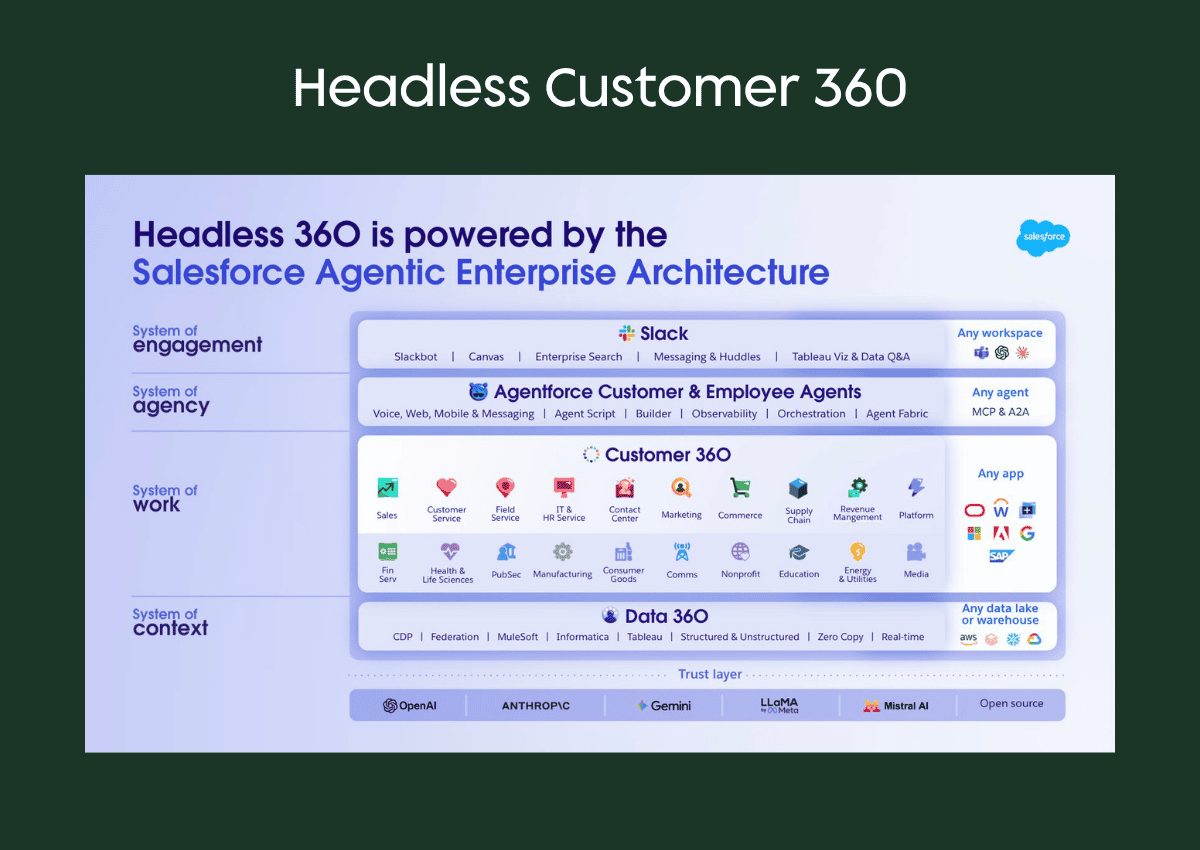
Data That Works Everywhere (Headless 360)
Headless 360 finally decouples the user interface from the data. Your complete customer profile isn’t trapped in one screen. It exists as data and logic that can be accessed securely from anywhere—a mobile app, a partner portal, or by an AI agent in Slack.
This flexibility is essential for AI. Agents from another system might update an Opportunity, or users might ask Agentforce to order a laptop from Slack. Information will surface to people and agents across more mediums, including Voice. All data needs to be available in any interface.
The Future of the Salesforce User Interface is React-ive
React is a framework for coding user interfaces much like Lightning Web Components, for when you need custom layouts and more control. Support for native Salesforce development seemed to come from nowhere, with a big push at TDX. Why?
Read between the lines, and the answer becomes clear: Slack and AI.
Slack is built on React. Today, Slack offers basic Block Kit components for cards with fields and buttons (create a case, update an account), but it’s limited. However, imagine Slack becoming the central workspace for more complex work—not just chatting, but collaborating with AI agents in the same interface where you communicate with people.
From a practical standpoint, React dominates the open-source ecosystem with vastly more libraries, support, and community contributions than Lightning Web Components. When AI helps you build interfaces, it’s going to be better at React.
The future is aligning:
- Slack as the conversation hub for people and agents
- React is easier to build and use everywhere
- More work will be done outside the standard Salesforce user interface
Key Takeaways
Enterprise Agentic AI is not about what cool results you can achieve if you give Claude access to all your accounts, it’s about giving people and agents secure access to rich context to deliver consistent, high quality results.
- Context is key: Enterprise-grade AI works best on unified platforms, and people can actually see Customer 360 where they work.
- Agentforce is your AI gateway: It orchestrates access to multiple LLMs while protecting your data with enterprise security.
- Slack is becoming your command center: Combined with Agentforce and Einstein Activity Capture, Slack has conversation, data, and AI in one place.
- MCP enables safe agent autonomy: Maps and guardrails let agents work effectively while maintaining security and control.
- React will unify the User Interface: Expect native React support to unlock new possibilities for Salesforce, Slack, and Agentforce interactions.
Who do you trust to establish your Agentic AI foundation?
If you’re evaluating how to bring AI into your Salesforce ecosystem, the biggest risk is not starting with the right foundation. Whether you’re consolidating systems, defining governance, or exploring Agentforce, aligning your data and architecture early will determine how successful your AI initiatives become.
If you want to pressure-test your approach or map out a practical path forward, our team can help.