

Understanding the Salesforce Field Service data model is essential for anyone implementing or managing field service operations. This guide walks through the core objects, their relationships, and how they work together to drive scheduling, reporting, and technician workflows.
Why the Data Model Matters
The Field Service data model directly impacts several critical aspects of your operations:
- Scheduling optimization – Enables automation and intelligent resource allocation
- Reporting accuracy – Ensures reliable insights via clean data relationships
- Technician experience – Powers the mobile app and on-site workflows
- Work management – Controls how jobs flow through your system
To understand how these outcomes are achieved, it’s helpful to start with the core objects that power Field Service.
Core Objects Overview
Field Service is built around five core objects that form the foundation of the entire system:
| Object | Purpose |
|---|---|
| Work Order Line Item | Individual task or component of the job |
| Service Appointment | A scheduled visit to perform work within time constraints |
| Service Resource | Person or crew who performs the work |
| Service Territory | Geographical or organizational area where Service Resources belong |
These objects don’t operate in isolation—they follow a structured sequence that drives how work is created, scheduled, and completed.
Data Flow
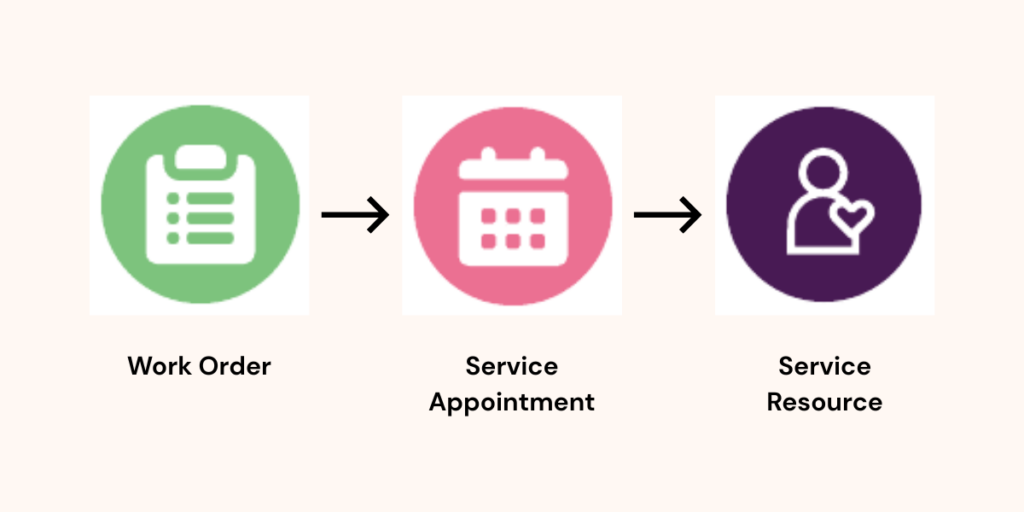
The relationship between core objects follows a specific sequence:
- Work Order is created first
- Service Appointment is created and tied to the Work Order (specifying earliest start date, due date, etc.)
- Service Resource is assigned to the appointment
Much of this can also be managed through the Dispatcher Console, which provides a graphical interface for scheduling.
From there, each object plays a distinct role in managing and executing work in the field.
Work Orders, Line Items, and Appointments
Work Orders
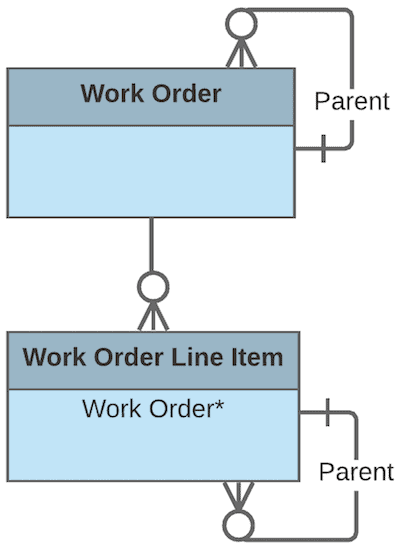
Work Orders serve as the parent record and can have complex relationships:
- Parent to Work Order Line Items
- Can be parent to other Work Orders (enabling nested structures)
Work Order Line Items
Work Order Line Items are optional but provide significant value:
- Drive part-specific work associated with assets
- Track job cost and pricing
- Automatically roll up and total on the Work Order
Example: An HVAC checkup Work Order might have line items like:
- Filter Replacement
- Clean Coils
Service Appointments
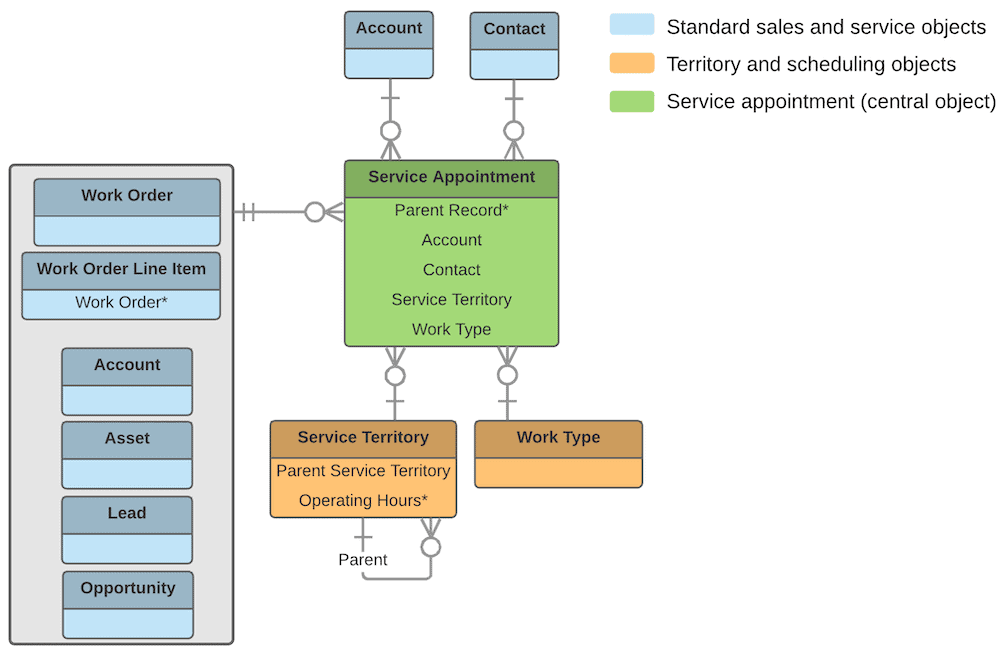
Service Appointments are arguably the most important object in Field Service. They:
- Drive scheduling and connect to the Dispatcher Console
- Hold information about:
- Estimated duration
- Physical address
- Due dates
- Tie everything together
The Dispatcher Console provides a calendar-type interface (rather than traditional Salesforce layouts) for managing appointments.
Once work is defined and scheduled, the next step is ensuring the right people are assigned to complete it.
Service Resources and Territories
Service Resources
Service Resources represent the crew or technician assigned to perform work. Resource records hold important details such as:
- Skills and skill allocation
- Skill points (tier levels)
- Certifications for matching requirements
Skills enable enforcement of rules when specific work requires technicians with certain certifications.
Service Territories
Service Territories determine which workers can be assigned to jobs in certain areas. Key features include:
- Resources must be assigned to at least one territory
- Prevents assignment mismatches (e.g., a Cleveland resource being assigned to Indianapolis work)
- Flexible enough to define based on your organization’s needs
Multi-Territory Assignments
Resources can belong to multiple territories with various configurations:- Primary territory – Main working area
- Secondary territories – Additional coverage areas
- Start and end dates – Enable temporary assignments, coverage, or transitions
While these core assignments handle who does the work and where, additional supporting objects help refine how that work gets scheduled and executed.
Supporting Objects
Several additional objects enhance Field Service functionality:
| Object | Purpose |
|---|---|
| Skills | Match the right technician to the right job |
| Operating Hours | Define availability for technicians and the business |
| Work Types | Provide templates for job setup; can auto-create Service Appointments |
| Service Crews | Group multiple technicians together |
| Resource Capacity | Limit hours a resource can work in a territory |
| Resource Absence | Track time off, sick days, and unavailability |
| Preferences | Define priorities and scheduling rules |
The Field Service Core Data Model

The Field Service core data model centers around the Service Appointment, connecting:
- Work Orders
- Accounts
Entitlements (for SLAs) - Work Types (to drive skill requirements)
- Skills and Skill Requirements
For detailed diagrams, reference the Field Service Developer Guide.
With that foundation in place, let’s address some common questions that come up in real-world implementations.
FAQ
How flexible is the Field Service data model in real-world scenarios?
The data model can be as flexible as your needs require. It really shines when you have clean data, allowing you to optimize the dispatcher experience and reduce manual effort. Additional objects like
- Resource Capacity, Resource Absence, and Preferences help handle real-world situations like:
Resources only working certain hours in a territory - Sick days and call-offs
- Emergency appointments and after-hours work
Custom automation can work behind the scenes to facilitate more complex scenarios, and much of this customization can work within the mobile app itself.
What's the minimum setup needed to use Field Service?
For manual dispatching without full automation, you need:
- Defined Service Territories (requires Operating Hours and Time Slots)
- Service Resources assigned to territories
- A process for creating Work Orders and Service Appointments
- Ideally, clean Asset data to associate and track work
You can ignore these objects when starting out:
- Skills
- Crews
- Shifts
- Capacity
- Resource Absence
- Preferences
What about Work Plans and checklists?
Work Plans are essentially checklists that can be assigned to Work Orders or Work Order Line Items. Technicians access these in the mobile app to check off requirements as they complete them. While not considered part of the core data model, they’re helpful for defining detailed on-site tasks.
Does Field Service handle detailed data collection for on-site work?
Field Service focuses on orchestrating work rather than capturing highly detailed, business-specific data collection. The platform provides:
- Line Items for work components
- Work Plans for checklists
For very detailed steps and unique data collection needs, you may need to customize or extend beyond the standard objects.
How do you handle naming confusion with clients?
Naming conventions can be challenging since clients often have their own terminology. Best practices include:
- Document definitions and agree on terms with stakeholders
- Repeatedly reinforce the mapping (e.g., “what you call a job, we call a Work Order”)
- Be patient—many Field Service objects have similar names, which can cause confusion even among experts
When is Field Service automation most valuable?
The deepest value comes when you have:
- All data clean and complete (including sick days, holidays, working hours)
- Automatic resource assignment based on location, skills, and availability
- GPS tracking to verify technicians arrived on site
- Completion verification for work done
For organizations doing more manual dispatching or with work centered in a warehouse rather than at client sites, the full automation features may provide less value.
What scheduling options exist beyond full Field Service?
- Scheduler (standalone) – Can be purchased separately for basic scheduling needs
- Customer Self-Schedule – Allows customers to request service appointments themselves
- Appointment Assistant – Empowers customers to schedule at their preferred time
These options work well for scenarios like scheduled pickups or customer-initiated service requests.
Ready to Get More Out of Salesforce Field Service?
A well-designed data model is what turns Field Service from a scheduling tool into a true operational advantage. If your team is navigating complex scheduling, inconsistent data, or manual dispatching, it may be time to revisit how your system is structured.
Explore how we help organizations design and optimize Salesforce Field Service solutions that scale with their operations.